Late tax returns create pricey problems fast. You can e-file most recent years in minutes, cut mail delays, and see acceptance updates within days. Electronic filing routes your federal return straight to IRS systems, which speeds up processing and refunds when you qualify. If you missed multiple years, you can still file taxes online for the current year and two prior years through supported software products, then mail older returns. Interest and penalties grow each month you do not file, but an online payment plan can help you handle what you owe while you file returns and bring your account current. You also gain clarity on income taxes right away and can aim for a max refund by answering filing questions carefully and matching forms to transcripts. Many filers set direct deposit to a savings account to separate refund money for bills or savings goals.
Why filing back taxes online is the fastest choice
Electronic filing moves your data directly into IRS systems and shortens the wait for confirmation. You avoid paper bottlenecks, postage, and manual data entry, which cut time and reduce mistakes on your federal return. You can import W-2 and 1099 data in many tax software tools, which lowers typos and speeds correct totals for individual income tax. You also gain a digital record of each submission that you can pull up later when lenders, schools, or agencies request proof. Online tax platforms walk you through your tax situation with clear prompts in English and en español, so you finish faster and with fewer errors.

Benefits of electronic filing vs paper returns
E-file confirms receipt far faster than certified mail and reduces the risk of lost paperwork. The IRS processes e-filed returns in weeks while paper returns can sit for months during peak season, so you reach outcomes sooner. Electronic filing also catches math errors in real time and flags missing forms before you submit, which helps you avoid delays and extra notices. You receive an electronic acknowledgment you can save with your records, which helps for mortgage underwriting or student aid. Many platforms also support direct deposit for refunds and direct debit for balances, which simplifies federal tax payments and helps you stay on schedule. You also receive status updates by email, and you can choose direct deposit to an FDIC insured bank account. If you prefer, you can pay by credit card, though processors add a fee. Some vendors offer a refund advance; read the fine print because it functions like a short-term loan. Direct File removes advertisements, while commercial products may show promotions in app. Some tax filing service providers promote a refund guarantee or audit defense; read terms on each website because these promises vary and do not change IRS decisions.
IRS-approved tax software for past years
Most IRS-authorized software products support the current year and two prior years for individual taxes. These programs format the correct prior-year forms, apply the right rates, and package the return for e-file when available. If your year falls outside that window, you can still prepare with software and print to mail. Look for providers that show clear prior-year support, offer data imports, and include tax tips that reflect the year you need. Many providers offer a free federal option for simple returns, while more complex filings may require a paid tier. Compare each tax filing service by form coverage, support hours, and whether they supply an audit report style checklist that helps you review risky areas before you submit. Ignore flashy claims like a tax savings gurantee and check real features, fees, and support quality instead. Desktop programs still serve power users who prefer local control without latency. Many vendors sell Deluxe tiers that add live help, an Audit Support Guarantee, or a Tax Savings Guarantee. Treat these as marketing. Check what the guarantee covers and whether it excludes prior years, business filings, or Guaranteed Business Returns. If you plan to file business entities, confirm whether the product supports Desktop Business Returns and whether it integrates with your personal file.
How online tools speed up processing
Online tools prefill data from last year, import payroll forms, and validate Social Security numbers before you submit. Built-in interview flows reduce overlooked credits and deductions that lower your income tax liability. Direct connections to IRS systems let you track acceptance and refund status quickly after you file online. Secure portals store your W-2s, 1099s, and receipts in one place, which makes amended returns or lender requests easier later. You also reduce rejections by matching names, birth dates, and employer identification numbers automatically.
Our services at Tax Hardship Center: online filing support that moves fast
Our services at Tax Hardship Center help you file recent years online and set up a path for older returns you must mail. If you need time to pay, our team can review balances and match you to a budget-fit plan, including a Streamlined Installment Agreement when you qualify. If money is tight, we evaluate Currently Not Collectible and prepare the financials required. For a broader view of options, see our core tax resolution services and how they integrate with e-file steps and transcripts. You can start in minutes by requesting a free consultation; we outline documents, timelines, and next actions before any work begins.
Easy IRS options for past due returns
The IRS offers several online channels that help you file and pay. Free File pairs eligible taxpayers with brand-name software at no cost for a free federal return. Direct File, when available for your state and situation, lets you file certain individual income tax returns directly with the IRS at no charge. Commercial software partners also support e-file for many past years and include clear guidance in both English and en español. If your facts get complex, you can connect with a tax professional online and share your documents securely.
Free File and Direct File programs explained
Free File serves taxpayers under a set adjusted gross income threshold each year and includes options in English and en español. It covers common wage and retirement scenarios and supports electronic filing for federal returns at no cost, with optional state filing through partner sites. Direct File, where available, lets eligible filers prepare and submit a federal return directly with the IRS, which removes ads and upsells and keeps the process simple. Both programs reduce cost and help first-time or lapsed filers get back on track without guesswork. Always review current-year eligibility and supported forms because coverage can change. Check eligibility criteria closely if you report unemployment income, education credits, or self-employment income on a schedule c form, since not all free options support every situation.
Using commercial tax software products
Commercial platforms handle a wider range of tax situations, including small business income on Schedule C, rental property tax, capital gains, and multiple state returns. Many programs support prior-year e-file for up to two years back and print-and-mail for older returns. You can add state modules, import brokerage files, and run what-if scenarios to plan payments. Look for clear pricing, included support, and transparent limits on which forms each product supports. Check whether the provider offers live help from an enrolled agent or CPA if you need it. Some suites include Desktop Business Analytics that summarize revenue, expenses, and business deductions for the Schedule C tax form and produce clear graphs you can share with lenders. Good tools also map dividend forms like 1099-DIV and interest forms into the right boxes without manual calculation. Review how the software handles consent preferences so you control any data sharing with affiliates. Confirm whether the platform offers audit defense, a realistic refund guarantee, and plain-language consent screens that explain how your data moves between the software and the IRS.
Online help from a tax professional
You can connect with an experienced tax professional through many platforms and finish returns remotely. Pros handle multi-year cleanup, penalty relief requests, and questions about self-employment tax or property tax items tied to rentals. Remote services allow secure uploads, screen shares, and e-signatures, which keep your filing momentum strong. If you owe, a pro can match your cash flow to the right online payment plan and prepare any required financial disclosures. You save time and lower risk because a seasoned preparer spots issues early and resolves them before they snowball. Ask about their expertise with audit defense, tax lien releases, and multi-year installment agreements so you cover every outcome. A pro can also file on your behalf once you sign engagement letters and consent forms, and many portals let you set consent preferences for each task.
How to file back taxes online step by step
You can complete most recent-year returns online in an afternoon. Start by gathering W-2s, 1099s, 1095 health forms, and any prior-year AGI or identity protection PIN. Choose an IRS program or a software product that supports your year and your forms. Work through the interview, upload documents, and confirm bank details for payment or refund. Submit the return, save your confirmation, and monitor your status until you see acceptance.
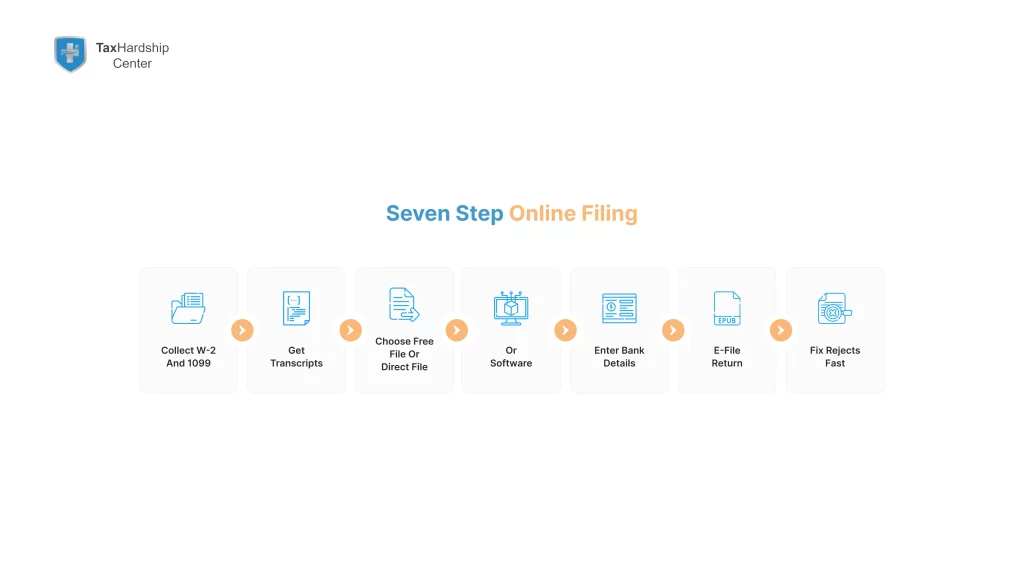
Gather your prior-year forms and records
Pull your W-2 and 1099 forms for wages, gig income, bank interest, and brokerage sales. Download 1095-A if you used the Marketplace and need to reconcile the premium tax credit. Collect receipts for deductible expenses, such as self-employed mileage, health insurance, and retirement contributions. Retrieve last year’s adjusted gross income and any IP PIN to pass e-file identity checks. If you lack a form, order a wage and income transcript online from the IRS and match it to your records before you file tax returns. Include Form 1099-G for unemployment income and verify income tax withholding amounts on each form. If a payer misspells your street or zipcpde, correct it in your profile and enter the numbers as shown on the form to pass matching checks. Some software labels a review as an audit report; use it to catch gaps before you submit. Keep a note to check income tax witholding on every wage and 1099 document so totals reconcile. Add dividend forms such as 1099-DIV and any K-1s to your docs list. Keep documentation for business deductions in a single folder and label files by year, form, and Zip Code to speed searches.
Select the right online filing option
Pick Free File if your income fits the current limit and your forms match what the provider supports. Try Direct File if your state and tax situation qualify and you prefer a no-frills federal return. Choose commercial tax software if you need business schedules, rental property detail, or multiple states. If you need advice, work with a tax professional who can prepare and e-file for you through an IRS-authorized channel. Make sure the option you choose supports the exact year you plan to file online. Review each site’s consent screens, website security statements, and data-sharing policies before you proceed so you understand where your information goes and who can view it. If you buy a paid tier like Deluxe, confirm that the upgrade actually solves your needs rather than just adding extras you will not use.
Submit your return and track acceptance
Run the built-in review so the software checks for missing names, SSNs, and signatures. Submit your federal return and save the e-file acknowledgment page to your records. Use the refund status tool or your software dashboard to watch for acceptance and any follow-up requests. If the IRS rejects the return for a mismatch, correct the item and resubmit the same day. If you owe, schedule an electronic payment or apply online for a payment plan to prevent collection notices. Set direct deposit to a savings account for safe, fast access to funds. Remember that a software refund guarantee does not speed IRS timelines or override a math change notice. Most providers also send email confirmations that show timestamps and submission IDs. If you pay by credit card, save the authorization code with your docs.
What to do if you owe more than you can pay
You still file right away, even if you cannot pay in full. Filing stops the larger failure-to-file penalty and starts the clock on resolution. Most taxpayers can apply online for a short-term plan or an installment agreement while they file successive years. You can also request penalty abatement for a clean history or submit an offer in compromise when hardship applies. The faster you file, the sooner you can set terms that fit your budget. For real-world options and examples, see our guide on what to do if you can’t afford to pay the IRS right now.
Applying online for IRS installment agreements
Use the Online Payment Agreement tool to request a monthly plan without phone hold times. Enter your balance, pick a draft date, and choose a payment amount that fits your cash flow. Short-term plans cover up to 180 days and do not charge a setup fee, while long-term plans add a one-time fee that drops if you pay by direct debit. You can change your draft date or amount later through your online account if your income shifts. A payment plan keeps your account in good standing and reduces enforcement risk while interest continues to accrue. You can also apply directly through the IRS Online Payment Agreement application. File quickly to reduce the chance of a tax lien and keep future refunds from full offset.
Payment plans available through electronic filing
Most software products let you set up a bank draft for a balance due at the same time you e-file. You can also submit Form 9465 within the filing flow to request an installment agreement when your balance qualifies. Direct debit plans reduce chance of missed payments and keep your plan active with less effort. Some platforms also support card payments, but bank drafts avoid extra fees from processors. If you owe on multiple years, coordinate payments with your plan so each new filing stays current. If you weigh plan choices, our comparison of IRS payment plans lays out fees, terms, and best-fit use cases.
Options for taxpayers with financial hardship
If you cannot afford any payment after rent, food, and medical costs, ask about Currently Not Collectible status. CNC pauses most collection actions when you document that you cannot pay. If your finances support only a partial settlement, explore an Offer in Compromise and use the IRS pre-qualifier tool before you apply. You can also seek penalty relief for reasonable cause or first-time abatement if you kept a clean record and filed on time in recent years. A qualified tax professional can help you choose the right path and assemble the paperwork. For a deeper walkthrough of offer payments, read our explainer on Offer in Compromise payments.
Avoid extra costs by filing online
Interest and penalties grow every month you leave a return unfiled. The failure-to-file penalty rises much faster than the failure-to-pay penalty, so filing first cuts the expensive part. Electronic filing also reduces errors that cause math notices and extra interest. When you e-file, you can pair the return with a payment plan or a scheduled bank draft, which trims the risk of more fees. Quick action lowers costs and helps you move forward without new surprises. Every dollar matters, so aim for clean calculation work and avoid late fees that eat savings. Mark the tax filing deadline on your calendar and use a tax filing extension only when you cannot finish on time, since an extension gives more time to file but not more time to pay.
How interest and penalties add up fast
The IRS charges a monthly failure-to-file penalty that stacks until you submit the return. A separate failure-to-pay penalty applies to unpaid balances and continues until you pay off the tax. Interest compounds on both tax and penalties, so delays get costly. Filing the return online stops the larger penalty from growing, even when you still need time to pay. You can then target the smaller monthly penalty with a plan that fits your budget.
Filing late taxes online to reduce added fees
E-file today to stop the late filing penalty from climbing any higher. Set a same-day bank draft for an affordable partial payment to cut interest. Add an installment agreement so you avoid new notices and stay current while you finish remaining years. Electronic filing also reduces reject risk, which limits back-and-forth mail that can add weeks and more interest. You save real money by cutting time and errors out of the process.
Keeping your account in good standing
Stay current on this year while you clean up the past. File on time going forward, even if you cannot pay everything on the due date. Keep your payment plan active with automatic drafts and update details when your income changes. Check your online account for balances, notices, and posted payments so you fix small issues before they grow. Good standing helps with loan approvals and lowers the chance of liens or levies.
Refunds you may still claim by filing online
You may still claim refunds for recent years if you file within the statute window. Many taxpayers leave money on the table from withholding, education credits, and the earned income credit when they skip a year. Electronic filing helps you calculate credits correctly and route a direct deposit to your bank. If you file multiple years, the IRS can apply refunds to other balances you owe. You keep more of your money when you file soon and claim what the law allows. You may also receive a state refund when state withholding exceeds liability, and some filers see a business tax refund when prior payments or estimates overshoot the final numbers.
IRS deadlines for refund eligibility
Federal law sets strict time limits to claim a credit or refund. You generally must file within three years of the original due date to receive a refund from that year. If you paid tax later, a two-year rule may apply based on when you paid. Miss the time window and the refund expires, even if you qualified for credits. File online now so you do not lose a refund you already earned. If you expect a refund, direct deposit to a savings account usually lands faster than a paper check and keeps funds separate from daily spending. These timelines apply across the United States and do not extend for most situations.
Using tax software to recover unclaimed refunds
Software prompts surface missed credits, such as the earned income credit, education credits, and recovery of excess withholding. Prior-year modules apply the right thresholds and phaseouts for the year you need. The interview guides you through dependents, school costs, and retirement contributions so you claim everything you can. Direct deposit delivers refunds faster and avoids lost checks. Keep routing and account numbers ready before you submit to speed the process. Update your profile with the correct Zip Code, bank details, and consent preferences. Review any changes driven by recent tax reform funds or law updates and see how those shifts affect your refund or balance.
Why filing online helps you claim faster
E-filed returns reach the IRS in minutes and enter processing queues ahead of mailed envelopes. Digital validation reduces errors that trigger manual reviews, which keeps your refund moving. You can check refund status online within days, not weeks, and resolve issues faster. Direct deposit hits your bank account sooner than a paper check, which improves cash flow. Online filing turns an unfiled year into funds you can use much sooner.
Online filing and Social Security benefits
If you run a business or work as a contractor, your Social Security credits depend on reported self-employment income. When you skip filing, you risk gaps in your earnings record that lower your future retirement benefit. Electronic filing with Schedule SE ensures that the Social Security Administration receives your self-employed earnings. Filing on time also makes it easier to correct your record if a wage report goes missing. You protect retirement income when you file every year and keep records clean.
How unfiled taxes impact Social Security credits
Self-employed income does not count toward Social Security benefits until you report it on a federal return with Schedule SE. If you delay too long, you may run out of time to correct missing years on your earnings record. Gaps can reduce your average indexed monthly earnings and lower your benefit for life. Filing now helps secure credits for the year and keeps your record accurate. You also avoid the stress of proving old income years later. Report all self-employment income and back it with clean books so credits apply correctly.
Electronic filing to protect retirement income
E-file with a complete Schedule SE so your net earnings carry over to your Social Security record. Use software that supports business schedules and calculates the self-employment tax correctly. Upload income and expense records so your numbers stand up if the IRS or SSA asks questions. Save your e-file acknowledgments with your tax documents so you can prove timely filing. Accurate, on-time electronic filing helps you protect both your federal return and your future benefits.
Staying compliant for future benefits
Keep business books current through the year so you do not scramble at tax time. Track mileage, receipts, and invoices with a tool you trust and back up your records. Make estimated tax payments each quarter to reduce year-end balances and penalties. File online each season, even in low-income years, so you protect Social Security credits and Medicare eligibility. Good habits now make retirement planning smoother later.
How online filing helps with loans and credit
Many lenders request your tax transcripts when you apply for a mortgage, line of credit, or business loan. Filed returns help banks verify income fast through IRS transcript services. Personal loans and student loan programs also rely on your federal return to set payment terms. E-filed returns give you a digital trail you can share quickly when a lender asks. You improve your financial profile when you keep filings current and accessible.
Mortgage and personal loan approvals
Mortgage lenders often pull IRS transcripts to verify stated income against your federal return. Filed returns keep your application moving and reduce back-and-forth during underwriting. If you run a business, lenders want to see complete Schedules C, E, and F along with your 1040. E-filed returns and clean transcripts show consistent reporting, which builds trust. You reach the closing table faster when your filings line up with your pay and deposits. Some platforms also generate an audit report style summary you can keep with your loan folder to show organization and readiness. Keep business docs neat so you can produce documentation on request without delays.
Student loans and back tax records
Income-driven repayment plans and aid forms use your tax return data to calculate payments and awards. Timely filing lets you transfer income information quickly through approved tools. If you skipped a year, fix it now so your records match what schools and servicers expect. Electronic filing and direct transcripts reduce errors and help you meet deadlines. Clean records help you secure the best terms you qualify for.
Filing online to improve financial standing
Up-to-date returns support credit decisions for cards, auto loans, and leases. Many landlords and lenders ask for recent federal returns as part of screening. E-file keeps those documents ready to share and easy to verify. Consistent filing also signals reliability, which can help with approvals and rates. You set yourself up for yes answers when your filings are current.
Deadlines for filing old returns electronically
Most software supports e-filing for the current year and two prior years. Older returns require print-and-mail, even if you prepare them with software. E-file windows vary by provider, but IRS systems accept a limited set of years at any time. You can still fix older years by mailing, which stops failure-to-file penalties, but e-file remains faster for the years it supports. File each open year in order and confirm acceptance before you move to the next.
Which past years you can still file online
As a rule of thumb, you can e-file the current tax year and the two years before it. For example, if you file in 2025, most platforms support electronic filing for 2024, 2023, and 2022. Returns older than that require mailing. Some providers phase in support later each season, so check their start dates. If you hit a limit, finish that year on paper and move to the next supported year online. When you mail a paper file, print your address and Zip Code clearly so postal scanners read them without errors. If you filed a tax filing extension, do not wait until the last minute; submit as soon as your documents arrive so interest stays low.
When you must mail instead of e-file
You must mail when your year falls outside the e-file window or your forms are not supported for electronic submission. Identity issues and certain special elections can also force paper. If you choose paper, print single-sided, sign, include all forms and schedules, and use a trackable mail service. Keep copies of everything you send. Paper takes longer, so mail today and follow with online filing for any years that still qualify.
IRS rules on electronic submissions
E-file requires correct names, dates of birth, and Social Security numbers for every person on the return. You also need last year’s AGI or an IP PIN for identity checks. Your software transmits the return through an authorized channel, and the IRS sends back an electronic acknowledgment. If your return rejects, fix the exact error and retransmit. Follow your software’s prompts for any form-specific rules so your return passes validation the first time.
What happens if you skip online filing
When you do not file voluntarily, the IRS can prepare a substitute for return based on Forms W-2 and 1099 reported by others. Substitute returns do not include deductions and credits you could claim on a complete return, which often raises the bill. If you ignore notices, the IRS can assess the balance and start collection with penalties and interest. You can still file your own return to replace a substitute, which usually lowers what you owe. Filing online speeds that correction and helps stop the cycle of notices. For official steps, review the IRS page on filing past-due tax returns, and use our guide to the IRS collection process to decode common notices.
Substitute for return assessments
A substitute for return uses third-party data and leaves out exemptions, dependents, and many credits. You often see a higher tax and faster collection because the system treats the assessment as due. You can replace a substitute assessment by filing your full return with proper forms and schedules. Online prep makes that replacement easier because you can import income data and complete the missing details. Do not wait for more letters when you can file today and fix the record.
IRS collection and enforcement actions
After assessment, unpaid balances trigger notices, penalties, and interest. If you continue to ignore the debt, the IRS can file a federal tax lien, levy wages or bank accounts, and offset future refunds. Payment plans and hardship status exist, but you need to file returns first to qualify. Electronic filing keeps you moving, reduces errors, and gets you into resolution programs faster. Filing stops the biggest penalties and sets you up for the next step. If an examiner opens a tax audit later, respond on time and consider professional help with audit defense. You protect more when you keep records for deductions, estimates, and prior notices in one place.
Why online filing avoids bigger problems
Online filing replaces guesswork with accurate numbers, which lowers the risk of inflated assessments. It also creates a record you can share with lenders, schools, and state agencies. You avoid delays tied to mail and manual processing, which shortens the penalty window. E-file also supports same-day payments and quick setup for plans that keep you compliant. You gain control when you file now rather than wait for more notices.
When to get professional help with online filing
Bring in a tax professional when you have business income, rental property, sales of investments, or multi-state issues. Hire help if you missed several years or received substitute assessments and collection notices. A pro can file multiple years at once, set up payment plans, and request relief where rules allow. Pros also handle communication with the IRS so you avoid missteps. Online collaboration tools make this process simple without office visits. Tax complexity grows fast when multiple forms, states, and business records pile up. Complexity increases error risk, so choose help before notices arrive.
Complicated individual income tax situations
Schedule C, K-1s, stock options, crypto sales, and rental real estate add layers that require care. Errors in basis, depreciation, or passive loss limits can cost you later. A professional confirms treatment, aligns carryovers, and prepares clean returns that pass checks. You get accurate numbers and fewer notices, which saves time and money. Good advice also helps you plan estimates and withholdings for the year ahead. If you qualify for tax exempt treatment on certain items, confirm qualifications early. Ask your pro to review business deductions for Maximum legal benefit and to verify Schedule C Tax Form details before submission.
Multiple years of unfiled returns
If you skipped several seasons, a professional builds a filing plan by year and tackles transcripts to match reported income. They stage submissions so e-file hits first for supported years and paper filings follow for older years. They also coordinate payment plans and penalty relief requests to fit your cash flow. When needed, they prepare statements that explain late filings and help you respond to notices. You get a clear path to current status without guesswork.
Support from IRS-recognized tax experts
Look for enrolled agents, CPAs, or attorneys with current PTINs and strong experience in individual tax. Ask about remote document exchange, fixed-fee projects, and timelines for multi-year work. Pros who file online through authorized channels deliver fast acknowledgments and clean records. They also plan next steps, such as installment agreements or offer in compromise requests, if you cannot pay in full. You gain speed, accuracy, and peace of mind when a qualified pro leads the process. Choose a team with real expertise in multi-year cleanup, notices, and audit defense so you stay protected from start to finish. Many firms provide clear email updates, requested docs lists, and a documentation portal that tracks each calculation.
At Tax Hardship Center, we help you finish and stay current
At Tax Hardship Center, we help you close open years and keep this season on time so penalties stop and your records support loans and benefits. We file for you through IRS-authorized channels, then set drafts that fit cash flow and prevent missed dates. When needed, we prepare requests for relief, negotiate plan changes, and guide reply letters so you do not lose momentum. For self-employed clients we also provide bookkeeping to support clean Schedule C numbers and year-round documentation. If hardship applies, our team prepares CNC files through our Currently Not Collectible support so collections pause while your situation stabilizes.
In summary…
You can fix back taxes faster and cheaper when you file online. E-file stops bigger penalties, speeds refunds, and opens payment plans that fit real budgets. Use Free File or Direct File if you qualify, or choose software products or a tax professional for complex returns. File the current year and the two prior years electronically when supported, then mail older years. Move now to protect refunds, Social Security credits, and your loan applications.
- File online to cut delays, stop larger penalties, and reduce errors.
- E-file routes data directly to IRS systems for faster acceptance and status updates.
- Digital checks reduce rejections and math mistakes that slow refunds.
- E-file routes data directly to IRS systems for faster acceptance and status updates.
- Use IRS programs and software products that fit your tax situation.
- Free File and, where available, Direct File serve simple cases at no cost.
- Commercial software supports complex forms and prior-year filings.
- Free File and, where available, Direct File serve simple cases at no cost.
- Act even if you cannot pay in full today.
- File first to stop the failure-to-file penalty and then apply for a payment plan.
- Consider CNC, penalty abatement, or an offer in compromise if hardship applies.
- File first to stop the failure-to-file penalty and then apply for a payment plan.
- Protect money and benefits.
- File within refund deadlines so you do not lose cash you already earned.
- Report self-employment income with Schedule SE to protect Social Security credits.
- File within refund deadlines so you do not lose cash you already earned.
- Keep records clean for loans, school, and future filings.
- E-filed returns and transcripts help with mortgages, student aid, and credit reviews.
- E-filed returns and transcripts help with mortgages, student aid, and credit reviews.
File back taxes online today and keep momentum. If you need hands-on help, the team at Tax Hardship Center can guide your cleanup, set up a payment plan, and keep you current without stress.
FAQs
Can I e-file prior-year tax returns?
Yes. Most platforms support e-filing for the current year and the two prior years. Older years require you to print and mail. When you e-file, you receive an electronic acknowledgment and can track status online. If a prior-year e-file rejects, correct the exact error and retransmit. Finish supported years online first, then close older years by mail.
How do I know if I qualify for Free File?
Check the current adjusted gross income limit for Free File and confirm that your forms match what each partner supports. Free File offers both guided software and fillable forms, and many offers appear in English and en español. If you have business income, rentals, or complex credits, you may need commercial software or a tax professional. Review partner details each season because limits and supported forms can change. If you do not qualify, compare paid software options that still enable e-file. Review eligibility criteria, including support for unemployment income, student credits, and a schedule c form for gig work.
What if I owe more than I can pay online?
File now to stop the largest penalty, then request a payment plan through the Online Payment Agreement tool. Short-term plans run up to 180 days and carry no setup fee. Long-term plans draft monthly and lower setup fees when you pay by direct debit. If your finances leave no room to pay, ask about hardship status or an offer in compromise. A professional can match your situation to the right option and assemble required documents. If a tax lien already exists, ask about subordination or withdrawal options after you set a consistent payment history.
How fast will the IRS process online back taxes?
Most e-filed individual returns move through initial processing in weeks, and many refunds arrive within 21 days. You can check acceptance and refund status within days using the IRS online tools. Paper takes much longer, so e-file whenever you can. Fix any reject messages fast to keep your place in the queue. Direct deposit and electronic payments also speed final resolution. Save refunds to a separate savings account to create a small cushion for next year’s estimated taxes.
Do I need a professional or can I file myself?
You can file yourself when your return stays simple and you feel comfortable with the forms. Use software checklists, import features, and built-in tax tips to guide your filing. Bring in a professional when you have business income, rentals, large investment sales, or multi-year cleanup. Pros also help with penalty relief and payment plans if you owe. Choose the path that saves time, cuts risk, and gets you current without delays. If you prefer a full-service route, use a tax filing service that offers clear consent terms, secure uploads, and year-round support.